
AI chatbots are becoming a common part of business websites, social messaging channels, customer support systems, and lead-generation workflows. Companies use them to answer questions, collect inquiries, assist with bookings, and stay available when their teams are offline.
However, deciding to use a chatbot is only the first step. The next question is often more important:
Should your business use a template chatbot or invest in a custom AI chatbot?
At first, both options may appear similar. They can display messages, ask questions, capture contact details, and direct visitors toward a service or support option. The difference becomes clearer when you examine how each chatbot is planned, written, integrated, tested, and maintained.
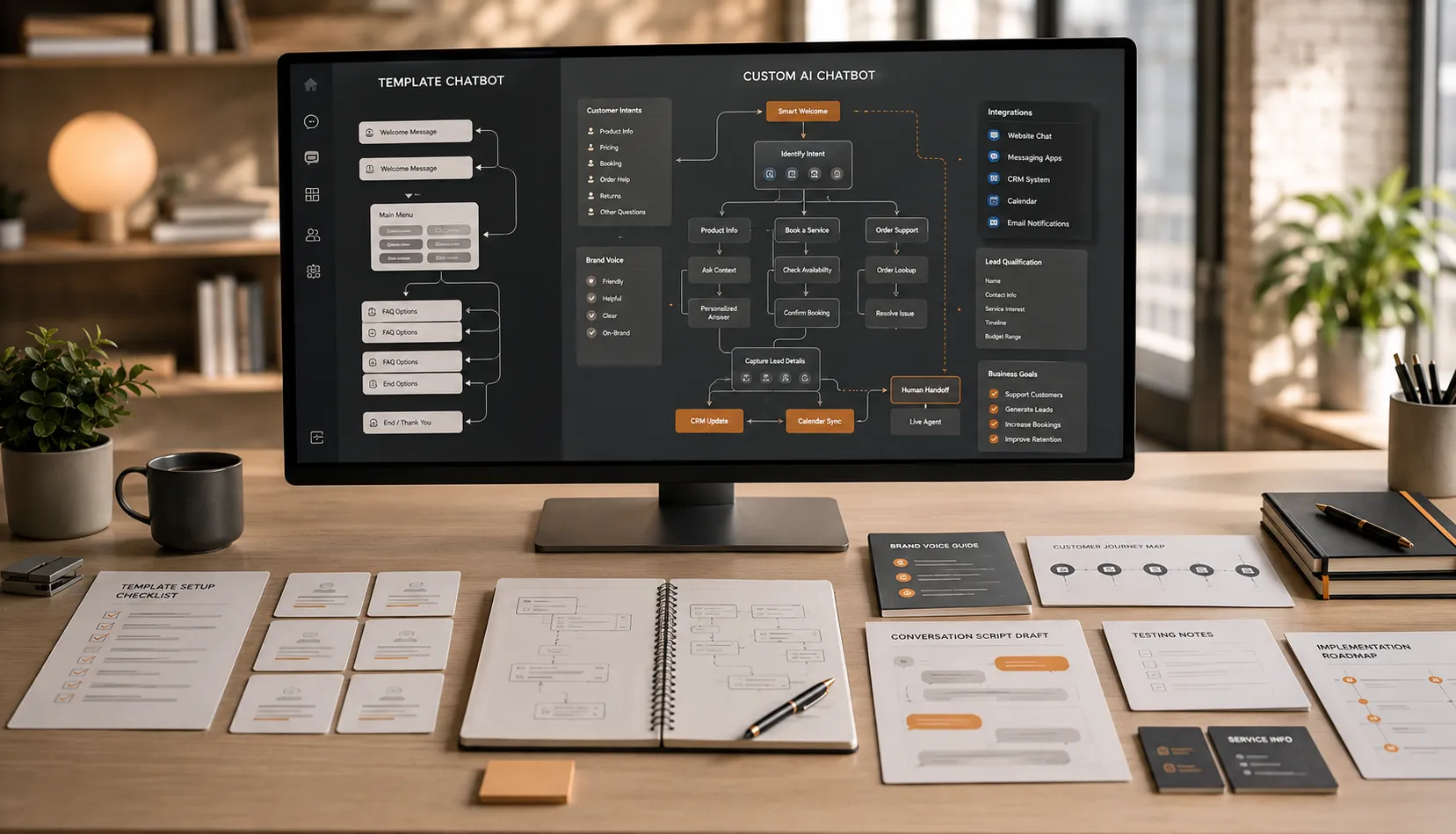
A template chatbot is usually designed to help a business launch quickly using pre-built conversation flows. A custom AI chatbot is developed around the business’s actual customers, brand voice, services, qualification process, and communication goals.
Neither option is automatically right for every business. A template may be suitable for a simple and temporary use case. A custom chatbot becomes more valuable when the business needs natural conversations, stronger brand consistency, better lead qualification, or deeper integrations.
This guide explains the differences between custom AI chatbots and template chatbots so you can choose the right approach for your business.
What Is a Template Chatbot?
A template chatbot is built using a pre-designed conversation structure.
The chatbot provider may offer ready-made flows for common purposes such as:
- Answering frequently asked questions
- Collecting names and email addresses
- Displaying service options
- Sending visitors to a contact form
- Sharing business hours
- Starting a basic booking request
The business selects a template, replaces some placeholder text, adds a logo or brand color, and publishes the chatbot.
This approach can be fast and affordable because much of the structure already exists. The business does not need to plan every interaction from the beginning.
However, the convenience also creates limitations. The chatbot is designed around a general use case rather than the business’s specific customer journey.
What Is a Custom AI Chatbot?
A custom AI chatbot is developed specifically for one business.
Its conversation structure, tone, responses, qualification questions, integrations, and user journeys are planned around how that business actually works.
The development process may include:
- Understanding the business and its customers
- Reviewing common customer questions
- Mapping the customer journey
- Defining the chatbot’s main goals
- Writing a complete brand-voice script
- Building custom conversation flows
- Connecting booking, CRM, or calendar tools
- Testing the chatbot before launch
- Reviewing real conversations after launch
- Updating the script over time
A custom chatbot does not simply display business information. It is designed to carry out a specific role within the business.
That role may include customer support, lead capture, appointment booking, service recommendations, lead qualification, conversation routing, or a combination of these functions.
The Main Difference: Setup vs Strategy
The biggest difference between a template chatbot and a custom AI chatbot is not necessarily the underlying AI technology.
The main difference is the amount of strategy behind the conversation.
A template chatbot begins with a pre-built system and asks the business to adapt to it.
A custom chatbot begins with the business and then builds the system around its needs.
This affects nearly every part of the customer experience.
1. Conversation Design
Template chatbots usually offer simple and predictable flows.
A visitor may see options such as:
- View services
- Check pricing
- Contact support
- Book an appointment
These choices can be helpful, but they may not reflect how real customers ask questions.
Customers often write naturally. They may ask:
- “I am not sure which package I need.”
- “Can someone help me today?”
- “Do you work with businesses like mine?”
- “What happens after I request a quote?”
- “Can I book before making a payment?”
A custom AI chatbot can be designed to understand these different intentions and guide each visitor through an appropriate path.
Instead of forcing everyone into the same fixed sequence, it can respond based on context.
2. Brand Voice
A template chatbot often sounds like the software provider that created it.
Its messages may be generic, overly formal, or similar to chatbots used by thousands of other businesses.
For example, a template may say:
“Thank you for your inquiry. Please select one of the options below.”
That sentence is not necessarily wrong, but it may not sound like the business.
A boutique hotel may want a warm and attentive tone. A local home-service company may prefer direct and reassuring language. A professional consultancy may require clear, polished, and precise responses.
A custom AI chatbot can be scripted to reflect those differences.
Brand-voice customization may define:
- How the chatbot greets visitors
- Whether the language is formal or conversational
- How long responses should be
- Which phrases the business commonly uses
- Which words should be avoided
- How pricing is discussed
- How the chatbot asks for contact details
- How it handles confusion or frustration
- How it introduces human support
This makes the chatbot feel like part of the brand rather than an external tool attached to the website.
3. Business-Specific Knowledge
Template chatbots usually depend on a limited set of manually entered FAQs.
They may answer simple questions, but they can struggle when the customer’s request involves multiple conditions.
For example, a service business may have different pricing based on location, property size, project type, or urgency. A clinic may need to distinguish between consultation types. A hotel may offer different booking policies for groups and individual guests.
A custom chatbot can be structured around these real business details.
It can ask follow-up questions before providing the next step. This creates a more accurate and useful conversation.
The quality of the chatbot still depends on the information supplied by the business. Custom development does not remove the need for accurate policies, service details, and regular updates.
4. Lead Capture
Both template and custom chatbots can collect contact information.
The difference is how and when they request it.
A template chatbot may ask for a name and email address immediately, before providing any useful information. This can make the conversation feel like a disguised contact form.
A custom chatbot can build value first.
It may answer the visitor’s question, understand the service they need, and then request only the details required for the next step.
For example, it may collect:
- Name
- Preferred contact method
- Service category
- Location
- Project timeline
- Appointment preference
- Relevant business details
The questions can be adjusted to the specific lead process.
This often creates a smoother experience because the visitor understands why the information is being requested.
5. Lead Qualification
Basic template chatbots may collect leads but provide little indication of their quality.
Every inquiry is passed to the team in the same way, even when some prospects are ready to buy and others are only browsing.
A custom AI chatbot can qualify leads according to the business’s actual requirements.
It may ask questions about:
- Service needs
- Budget range
- Geographic location
- Urgency
- Business size
- Project scope
- Desired start date
- Eligibility requirements
Based on the answers, the chatbot can direct the visitor toward:
- An immediate booking
- A custom quotation
- A sales consultation
- General service information
- A different solution
- Human assistance
This helps the business spend more time on relevant opportunities.
6. Booking and Appointment Flows
A template chatbot may provide a link to a booking page.
That is useful, but it does not always help the customer select the right appointment or prepare the required information.
A custom chatbot can support the complete booking journey.
It may:
- Identify the required service
- Ask preliminary questions
- Explain what the appointment includes
- Confirm location or availability conditions
- Connect to a calendar
- Offer suitable booking options
- Collect information for the team
- Confirm what happens after the booking
This reduces friction and can improve the quality of booked appointments.
7. Integrations
Template chatbot plans often provide a limited set of standard integrations.
They may connect to a contact form, email notification, or a common scheduling tool.
For simple needs, this may be enough.
A custom chatbot can be connected more closely with the systems the business already uses, including:
- CRM platforms
- Booking systems
- Business calendars
- Lead pipelines
- Internal notification tools
- Customer-support workflows
- Email systems
- Multi-location routing processes
The purpose of integration is not to add unnecessary technology. It is to ensure that chatbot conversations lead into the business’s existing workflow.
A lead should not remain hidden inside a separate chatbot dashboard that no one checks.
8. Human Handoff
Template chatbots may provide a basic “contact us” option when they cannot answer a question.
A custom chatbot can create a more thoughtful handoff.
It may recognize that the customer:
- Has a complex question
- Is becoming frustrated
- Needs account-specific assistance
- Wants to speak with a person
- Has a high-value sales inquiry
- Is dealing with an urgent matter
Before transferring or recording the inquiry, the chatbot can collect context and provide the team with a conversation summary.
This allows the human representative to continue the interaction without asking the customer to repeat everything.
9. Testing and Quality Assurance
Template chatbots are often launched after basic text changes.
The business may check that buttons work and then place the chatbot on the website.
Custom chatbot development usually involves deeper testing.
Testing may include:
- Different ways of asking the same question
- Incomplete or unclear messages
- Misspellings
- Unexpected customer requests
- Mobile usability
- Lead qualification paths
- Booking flows
- Integration accuracy
- Human escalation
- Tone consistency
- Unsupported or sensitive questions
The script may also be read aloud to identify responses that sound unnatural.
This testing process helps the chatbot feel more prepared when real customers begin using it.
10. Ongoing Optimization
A template chatbot is often treated as a finished tool after launch.
It may continue running with the same script for months, even when customers repeatedly ask questions that it cannot answer.
A custom chatbot can be improved based on real conversations.
Ongoing reviews may identify:
- New FAQs
- Outdated information
- Confusing responses
- Weak qualification questions
- Abandoned booking flows
- Missed lead opportunities
- Repetitive human handoffs
- Changes in customer language
The script can then be adjusted to improve performance.
This is one of the most important advantages of custom chatbot management. Customer conversations become a source of practical business insight.
Custom AI Chatbot vs Template Chatbot Comparison
Here is a simple comparison of the two approaches.
Template Chatbot
A template chatbot usually offers:
- Faster initial setup
- Lower starting cost
- Pre-built conversation flows
- Basic FAQ responses
- Standard lead capture
- Limited customization
- Standard integrations
- Minimal ongoing strategy
It may be appropriate for businesses with simple needs, limited budgets, or a temporary campaign.
Custom AI Chatbot
A custom AI chatbot usually offers:
- Business-specific conversation strategy
- Custom brand-voice scripting
- Flexible customer journeys
- Detailed lead qualification
- Booking and service-selection flows
- CRM and calendar integrations
- Human handoff planning
- Testing and quality assurance
- Ongoing monitoring and revisions
It is more suitable for businesses where communication quality directly affects leads, bookings, trust, or customer satisfaction.
Which Option Costs More?
A template chatbot usually has a lower initial cost because the business is using a pre-existing framework.
The price may include access to the software but not necessarily strategy, professional scripting, testing, setup support, or monthly optimization.
A custom chatbot usually requires a larger setup investment because more work is involved.
That work may include:
- Business research
- Conversation planning
- Brand-voice development
- Scriptwriting
- Custom flows
- Integration setup
- Testing
- Deployment
- Ongoing revisions
The right comparison is not only the subscription price.
Businesses should compare what they are responsible for doing themselves and what the service provider will manage.
A cheaper chatbot can become costly if employees must spend significant time rewriting responses, fixing flows, transferring information, and checking a separate dashboard.
When Is a Template Chatbot the Better Choice?
A template chatbot may be suitable when:
- The business only needs basic FAQs
- The customer journey is very simple
- No custom integrations are required
- The chatbot is being tested temporarily
- The business has a very limited budget
- Brand voice is not a major concern
- The team can manage setup and updates internally
For example, a temporary event page may only need to share dates, location details, and a registration link. A custom system may not be necessary for that limited use case.
When Is a Custom AI Chatbot the Better Choice?
A custom chatbot is generally more appropriate when:
- The business receives regular customer inquiries
- Leads need to be qualified
- Appointments or consultations are important
- The business offers multiple services
- Customer trust depends on communication quality
- Brand voice must remain consistent
- Several channels need to be supported
- CRM or calendar integrations are required
- Human handoffs need to be organized
- The chatbot must improve over time
Service businesses often benefit most because conversations directly influence whether a visitor becomes a lead or customer.
Questions to Ask Before Choosing
Before selecting either option, a business should ask:
- What should the chatbot achieve?
- Which customer questions should it handle?
- Does the chatbot need to sound like our brand?
- Should it qualify leads or only collect contact details?
- Does it need to support bookings?
- Which channels will it use?
- Which business systems should it connect with?
- Who will update the script?
- How will human handoffs work?
- How will performance be reviewed?
These questions help determine whether a template can meet the requirements or whether a custom solution is justified.
Can You Start with a Template and Upgrade Later?
Yes, but the transition may require more work than expected.
A business can use a template chatbot to understand basic customer behaviour. However, the existing script and structure may need to be rebuilt when moving to a custom system.
This is especially likely if:
- The original chatbot collected poor-quality leads
- The business needs new integrations
- The brand voice was never defined
- The conversation flows are too rigid
- The existing platform limits data access
- Multiple channels need to be added
Starting with a template can be useful for testing demand, but businesses should avoid building important long-term processes around a system that cannot grow with them.
Final Thoughts
Template chatbots and custom AI chatbots can both automate customer conversations, but they are designed for different levels of business need.
A template chatbot offers speed, simplicity, and a lower initial cost. It can be useful for basic FAQs, temporary campaigns, or businesses with straightforward customer journeys.
A custom AI chatbot offers deeper value when conversations influence support quality, lead generation, bookings, and brand trust.
The custom approach includes more than chatbot software. It involves understanding the customer journey, writing a brand-aligned script, creating qualification logic, connecting business tools, testing the experience, and improving the system after launch.
The best choice depends on what the business expects the chatbot to accomplish.
AIChatbotopia develops custom AI chatbots that begin with a real conversation script rather than a generic template. Each chatbot is designed around the client’s brand voice, customer questions, lead process, selected channels, and existing business tools.
Businesses can explore available solutions at https://aichatbotopia.com/services/, review plan options at https://aichatbotopia.com/pricing/, or request a tailored recommendation at https://aichatbotopia.com/get-a-quote/.